A blockchain explorer is a read-only search interface for a public blockchain. It indexes node data and displays transactions, addresses, blocks, and—on smart-contract chains—tokens so users can verify on-chain activity without holding private keys.
A blockchain explorer is a search engine for a public blockchain: it indexes blocks, transactions, and addresses from network nodes and presents that ledger data in a human-readable web interface. Tools such as Etherscan, BscScan, and Blockchain.com Explorer let anyone look up a TXID, wallet balance, or block without running a full node or reading raw hex.
Public chains already publish every confirmed transfer, but the native format is machine-oriented. A blockchain explorer bridges that gap by providing a readable interface for payment checking, token-flow research, and contract inspection. Dashboards often refresh in real time as new blocks arrive, which helps users track activity as it lands. The interface is observational only: it does not hold funds, sign transactions, or replace a wallet. Understanding blockchain explorers and onchain data visibility starts with that read-only boundary and the transparency public ledgers promise.
What Is a Blockchain Explorer? How Does It Relate to a Search Engine?
A blockchain explorer is a specialized search engine for one or more public ledgers. Users enter a transaction hash (TXID), address, block height, or token contract, and the site returns structured fields—status, timestamps, amounts, fees, and related links—drawn from indexed chain data.
Blockchain explorer meaning is therefore simple: searchable access to public ledger records without running node software. Unlike a web search engine that ranks documents, an explorer queries a ledger state built from blocks. Bitcoin-focused explorers emphasize UTXO inputs and outputs; Ethereum-family explorers surface account balances, ERC-20 transfers, and internal transactions. The shared role is accessibility—anyone can independently verify what the network recorded. In practice, “block explorer” means the same class of tool as “blockchain explorer.”
Why use a blockchain explorer? It provides independent confirmation details that screenshots alone cannot ensure, allowing users to prove a payment without trusting a custodial screenshot alone. Specialized blockchain explorers extend the same idea to niches, while leading Bitcoin block explorers and top Ethereum block explorers optimize for each chain’s data model. Analysts also explore token movements and monitor contract activity through the same interface without custody risk.
Concept
Role
Blockchain
Append-only public ledger of blocks and transactions
Full node
Software that validates and serves raw chain data
Blockchain explorer
Indexed UI that searches and displays ledger records
Wallet
Software that holds keys and can send transactions
The table separates read-only visibility from custody. Confusing an explorer with a wallet is a common beginner error and a phishing risk when fake “explorer” pages ask for seed phrases. Key features and metrics tracked on a typical view include confirmation count, fees, block height, and—when present—token transfer details. Developers rely on the same pages to inspect contract calls and tokens after a deployment.
How Does a Blockchain Explorer Work? From Nodes to a Searchable UI
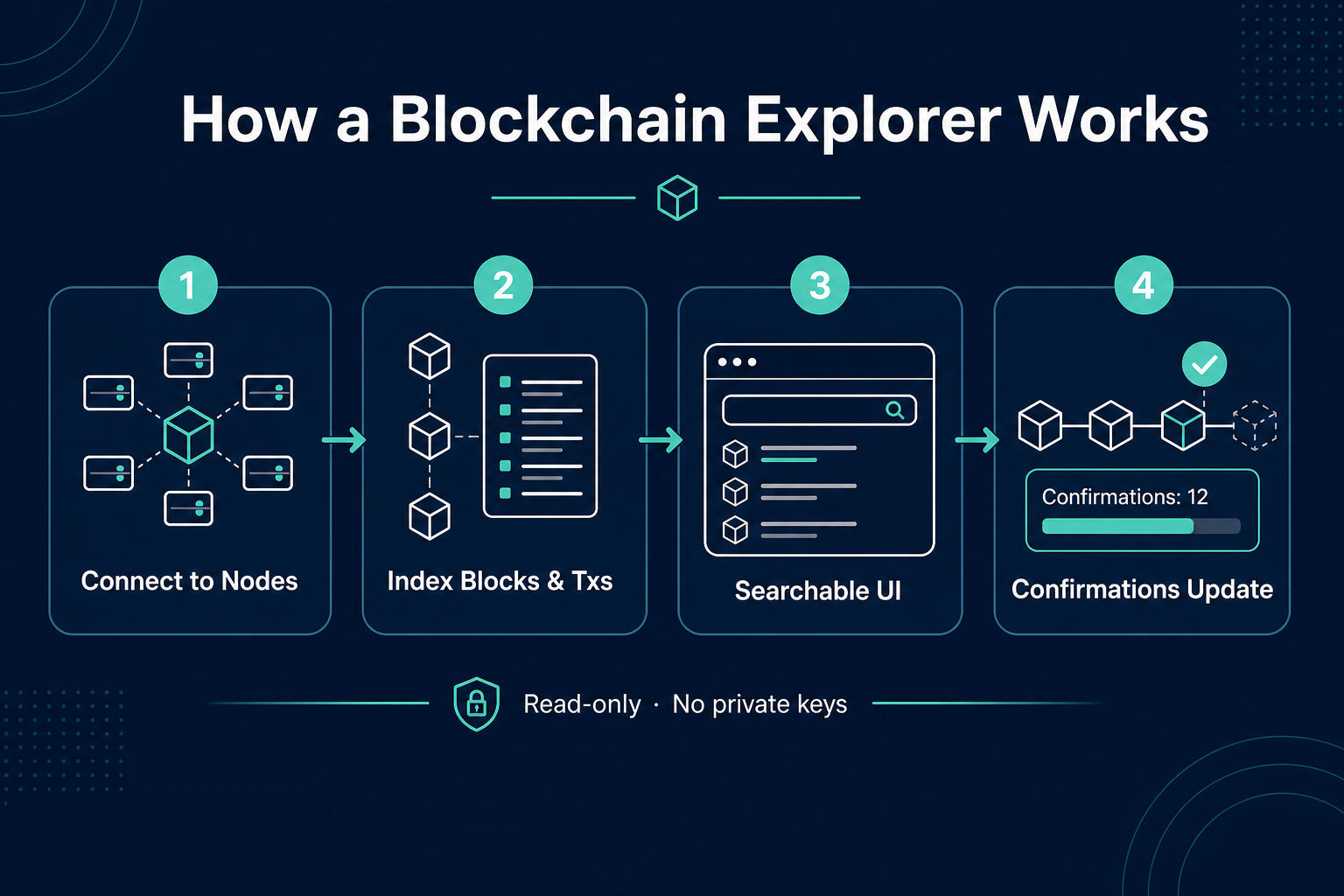
How does a blockchain explorer work? In four steps:
Connect to blockchain nodes (self-operated or third-party) and receive new blocks plus mempool candidates.
Parse and index amounts, addresses, token standards, and contract events into a lookup database.
Serve searchable pages so a specific hash, address, or height returns human-readable information in seconds.
Update confirmation status as later blocks add depth after a transaction is included.
How a block explorer works behind the scenes is indexing plus an interface—not custody. When operators advertise real time indexing, they usually mean low-latency ingestion from peers or RPC feeds—not a guarantee that every mirror matches at the same millisecond. That pipeline is providing the information users see when checking a specific hash. The same interface lets users track pending items and monitor when value has transferred to the destination address, allowing treasuries and individuals to work from the same public evidence.
Confirmation status matters. Pending entries may appear from the mempool before inclusion; confirmed entries appear after a block includes the transaction and subsequent blocks add depth. Different explorers may refresh at slightly different speeds because indexing pipelines differ, even when they read the same chain. Research and analysis workflows often compare two explorers side by side when one view lags during congestion. Understanding those lags helps ensure you do not mark a payment failed too early. Transparency depends on reading confirmation depth, not a single flash of “success.”
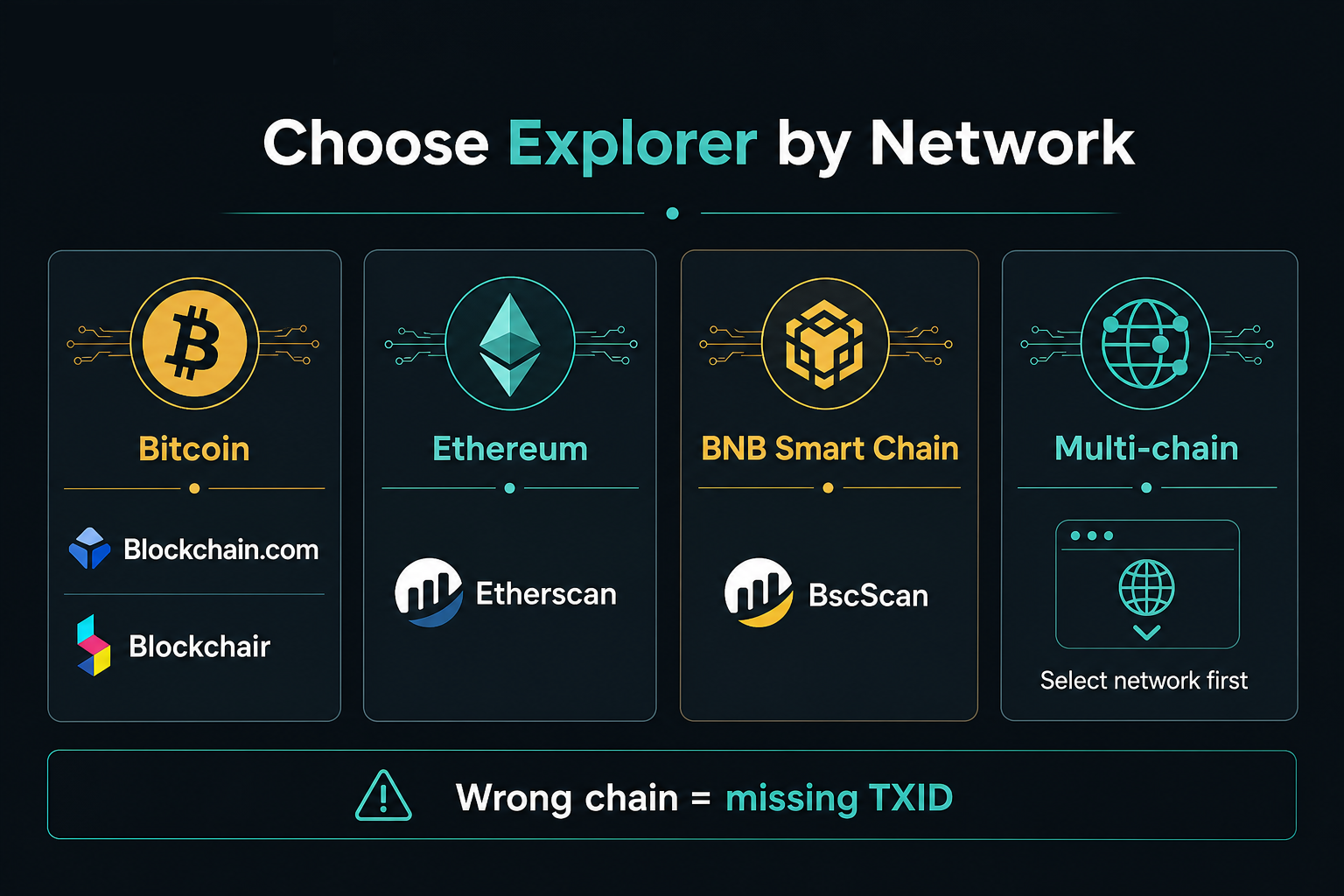
For multi-chain ecosystems, each network usually needs a matching explorer or a multi-chain product with the correct network selected. Searching an Ethereum TXID on a Bitcoin-only explorer returns nothing useful—chain identity is part of every query. Types of explorers and popular examples still follow the same rule: match the network, then read the details. Practical applications include deposit verification, treasury reconciliation, and debugging failed contract calls. Developers also use explorers when testing dApp applications that emit tokens or collect fees.
Figure 1. Blockchain explorer flow: nodes → index → searchable UI → confirmation updates.
What Information Can You Usually Find on a Blockchain Explorer?
Most explorers expose a similar core set of pages. Transaction pages show sender, recipient, amount, fee, block, and confirmation count. Address pages list balance estimates and transfer history. Block pages list height, timestamp, miner or proposer context, and included transactions. On smart-contract chains, token and contract pages add holders, supply views, and verified source when available. Token top holders lists help readers see concentration at a glance, but concentration alone is not a quality score.
A blockchain explorer is useful because it provides structured information so a specific payment can be audited. A deeper walkthrough of address, token, contract, and internal-transaction fields appears in Address, token, and contract data pages. Popular blockchain explorers also surface mempool candidates so users can watch a payment move from pending to confirmed in real time, then drill into logs when a contract-mediated swap obscures the simple from/to summary. Checking those nested details helps ensure the token amount—not only the gas line—matches expectations. Users who explore token tabs can see what actually transferred, not only the native fee line.
Query type
Typical inputs
Typical outputs
Transaction
TXID / tx hash
Status, from/to, value, fee, block
Address
Public wallet or contract address
Balance view, transfer list
Block
Height or block hash
Timestamp, tx count, rewards context
Token / contract
Contract address or ticker search
Transfers, holders, ABI/source if verified
Why use a block explorer for this information? It is providing a public view of ledger facts without custodial access. The table maps what to paste into the search bar and which fields to read first when verifying a payment. Developers checking contract receipts often start with the same rows.
How Do You Check a Crypto Transaction With a Blockchain Explorer?
To verify a transfer, choose an explorer for the correct chain, paste the TXID from the sending wallet or exchange withdrawal record, then read status, confirmations, amount, and fee. If only an address is known, open the address page and locate the matching outbound or inbound transfer by time and amount. How to use a blockchain explorer for verification is mostly literacy—correct network, full hash, and careful reading of token-transfer rows. Checking a specific transaction id against the destination address is the core habit. The goal is to track whether funds transferred as expected and to monitor confirmation count until the receiving side credits the deposit.
A full checklist—including common errors such as wrong network, truncated hashes, and confusing pending with failed—is covered in Verify a crypto transfer step by step. Teams that operate treasuries often keep a short internal guide so every member checks the same fields before marking a payment received. Understanding shared checklists helps ensure consistent reading of confirmation details across a team. These applications of explorers work best when everyone uses the same trusted interface.
Explorers do not move coins. If a page asks for a private key, seed phrase, or “validation deposit,” it is not a legitimate explorer workflow. Start exploring the blockchain by viewing one known TXID and comparing the on-chain information with your wallet receipt. That short practice builds confidence before you track larger transfers.
Which Blockchain Explorers Are Common, and How Should You Choose?
Choice follows the chain first, then feature depth:
Need
Common starting explorer
Bitcoin payments
Blockchain.com Explorer, Blockchair, or another BTC-capable explorer
Ethereum / ERC-20
Etherscan
BNB Smart Chain / BEP-20
BscScan
Multi-chain discovery
Multi-chain explorers or explorer families, with network selected first
Leading Bitcoin block explorers and top Ethereum block explorers differ mainly in data model and tooling depth, not in the core idea of searchable public data. Top 8 block explorers style roundups are useful for discovery; selection still depends on providing coverage for your specific network.
A structured comparison of Etherscan, BscScan, and Blockchain.com Explorer lives in Etherscan vs BscScan vs Blockchain.com. Matching the explorer to the network prevents false “missing transaction” conclusions.
Always open explorers from trusted bookmarks or official documentation links. Phishing sites clone layouts and harvest credentials when users treat any search result as safe. Free public explorers are enough for most payment checks; paid analytics suites add screening layers that ordinary deposit verification does not require.
Figure 2. Choose by network first: Bitcoin, Ethereum, BNB Smart Chain, or multi-chain with the correct network selected.
What Limits and Risks Come With Using a Blockchain Explorer?
Limitations and challenges include indexing lag during congestion even when marketing copy promises real time coverage. Address balances are public by design on transparent chains, yet they do not reveal legal identity by themselves. Lookalike addresses and token-name spoofing can mislead readers who trust ticker symbols instead of contract addresses. Checking contract addresses carefully helps ensure you are viewing the intended asset. Transparency on a public ledger is not the same as personal privacy.
Operational risks include fake explorer domains, malicious browser extensions on explorer tabs, and scams that instruct users to “sync” wallets through explorer-like forms. Privacy-conscious users should remember that searching their own address links that activity to their IP and browser fingerprint on the explorer operator’s logs. Deanonymizing heuristics used by analytics platforms are separate products; a basic explorer page does not equal identity resolution. Understanding that boundary prevents over-reading a public view. Users who explore analytics add-ons should still monitor only public data and avoid any interface that asks for keys.
Explorers are not investment advice engines. On-chain visibility supports verification and research; it does not guarantee project quality, future price, or recovery of lost keys. The future of onchain visibility will keep adding analytics layers, but the core value remains providing clear transaction details for specific hashes so users can track what transferred and when.
Key Takeaways
A blockchain explorer translates public ledger data into searchable pages for transactions, addresses, blocks, and—on smart-contract chains—tokens and contracts. It works by indexing node data into a query-friendly database and UI. Correct chain selection, TXID literacy, and skepticism toward phishing clones determine whether the tool helps or harms. Checking information in the right view—and ensuring details match the intended network—is the practical outcome of understanding explorers. For hands-on verification, selection comparisons, and field-level reading, use the linked cluster guides after this overview.
FAQ
What is a blockchain explorer?
A blockchain explorer is a web tool that searches and displays public blockchain data—transactions, addresses, blocks, and often tokens—in human-readable form. It connects to network nodes, indexes ledger records, and returns structured pages for a TXID, address, or block height. It is read-only and cannot control funds or replace a wallet.
How does a blockchain explorer work?
Most explorers connect to blockchain nodes, index blocks and transactions into a database, and serve searchable pages. Users query by hash, address, or height; the UI returns status, amounts, fees, and related links from that index. Pending items may appear before inclusion; confirmed items gain depth as later blocks arrive.
How do I check a crypto transaction on a blockchain explorer?
Select an explorer for the correct network, paste the full TXID from the sending wallet or exchange withdrawal record, then review status, confirmations, amount, fee, and destination. If the TXID is unavailable, open the address page, match the transfer by time and value, then open that transaction for full details.
Can anyone see my wallet balance on a blockchain explorer?
On transparent public chains, anyone who knows a public address can usually view its on-chain balance and transfer history. That visibility is ledger transparency, not proof of who owns the address offline. Searching your own address can also create a privacy trail with the explorer operator.
What is the difference between a blockchain explorer and a crypto wallet?
An explorer displays ledger data; a wallet holds private keys and can authorize sends. Block explorer vs. wallet vs. exchange is a useful mental model: the explorer is for reading, the wallet for signing, and the exchange for custodial trading accounts. Explorers cannot move assets. Any page that requests keys, seed phrases, or a “validation deposit” is outside normal explorer use.
Is it safe to use a blockchain explorer?
Using a reputable explorer to look up public data is a standard verification practice when you stay read-only. Safety breaks on fake domains, malicious extensions, and prompts that ask for private keys. Bookmark trusted URLs such as Etherscan, BscScan, or Blockchain.com Explorer and never enter seed phrases to “unlock” a transaction view. Most major public explorers also provide free search for ordinary payment checks, allowing beginners to work through a real example—“I sent crypto and it hasn’t arrived yet”—without paying for analytics.
Author: Jayne
Disclaimer
* The information is not intended to be and does not constitute financial advice or any other recommendation of any sort offered or endorsed by Gate.
* This article may not be reproduced, transmitted or copied without referencing Gate. Contravention is an infringement of Copyright Act and may be subject to legal action.
Solana faces both opportunities and challenges in its development. Recently, severe network congestion has led to a high transaction failure rate and increased fees. Consequently, some have suggested using Layer 2 and appchain technologies to address this issue. This article explores the feasibility of this strategy.
Sui is a PoS L1 blockchain with a novel architecture whose object-centric model enables parallelization of transactions through verifier level scaling. In this research paper the unique features of the Sui blockchain will be introduced, the economic prospects of SUI tokens will be presented, and it will be explained how investors can learn about which dApps are driving the use of the chain through the Sui application campaign.
This article introduces the technical principles, framework, and applications of Zero-Knowledge (ZK) technology, covering aspects from privacy, identity (ID), decentralized exchanges (DEX), to oracles.
Tronscan is a blockchain explorer that goes beyond the basics, offering wallet management, token tracking, smart contract insights, and governance participation. By 2025, it has evolved with enhanced security features, expanded analytics, cross-chain integration, and improved mobile experience. The platform now includes advanced biometric authentication, real-time transaction monitoring, and a comprehensive DeFi dashboard. Developers benefit from AI-powered smart contract analysis and improved testing environments, while users enjoy a unified multi-chain portfolio view and gesture-based navigation on mobile devices.